Rename FilesWindowsBulk Rename Utility vs Renomee AI
📢 This comparison is written by the Renomee team — we make one of the tools reviewed here. We've aimed to fairly represent where BRU wins.
Comparison Guide · Windows Batch Renaming

Bulk Rename Utility vs Renomee AI: 8 Real-World Renaming Tasks Compared

If you've spent 30 minutes configuring a BRU regex that still doesn't produce what you want — or you need to rename files based on what's written inside them, not what they're already called — this comparison is for you. Eight real scenarios, including tasks that no rule-based tool can handle.
8
Use cases tested
3
Where BRU leads
1
Only AI can do
Try Renomee FreeJump to Test Results
Renomee — describe your rename rule in plain English

Quick Verdict — Which Tool Should You Choose?

Seven scenarios. Match your before filenames to yours — that's your tool.

You need exact sequential numbers — specific start, step, zero-padding, position

before
−photo_1.jpg
−photo_2.jpg
−photo_3.jpg
→
after
+project_0001.jpg
+project_0002.jpg
+project_0003.jpg

BRU's Number panel gives explicit control: start value, step size, zero-padding width, prefix or suffix position. Deterministic across 10,000 files. · ×1,000 files · fully offline

Use BRU →

Your workflow is scripted — regex patterns, JavaScript logic, or CSV-driven rules

before
−report_2024_Q3_draft.docx
−report_2025_Q1_draft.docx
→
after
+2024-Q3_report.docx
+2025-Q1_report.docx

BRU's Script panel runs full JavaScript methods and regex against filenames. Purpose-built for IT pipelines. Fully offline, deterministic. · JavaScript · regex · CSV presets

Use BRU →

You've written three regex patterns for the same task — none handles every file cleanly

before
−FY2024_Q3_Sales_v2_DRAFT.xlsx
−Sales_Report-Q4_2024_FINAL.xlsx
−Q1-2025_Sales_Interim_Rev3.xlsx
→
after
+2024-Q3_Sales_Report.xlsx
+2024-Q4_Sales_Report.xlsx
+2025-Q1_Sales_Report.xlsx

You've debugged one regex for the underscores, another for the date format, a third for the version suffix — and a new file still breaks it. Renomee processes each filename against a single plain-English description of intent. No pattern to maintain, no edge case to patch. · mixed patterns · 1 instruction · no maintenance

Use Renomee →

You know exactly what you want the files called — you just don't want to write regex for it

before
−Report 15-03-2026.pdf
−Report_2026.04.20.pdf
−Report Apr 28 2026.pdf
→
after
+2026-03-15_Report.pdf
+2026-04-20_Report.pdf
+2026-04-28_Report.pdf

These three files use three different date formats. In BRU you'd need a separate regex pattern for each. In Renomee you type: 'rename each file using the date in the name, formatted as YYYY-MM-DD, followed by Report' — the AI handles every format in one pass. · plain English · no regex knowledge needed

Use Renomee →

The real name is written inside the file — not in the filename

before
−scan_001.pdf
−scan_002.pdf
−IMG_9823.jpg
→
after
+Acme_Corp_INV-2024-1847.pdf
+TechCorp_PO_0283.pdf
+golden_retriever_sunny_park.jpg

Renomee reads what's written in each PDF, OCR-scans handwritten or printed invoices, and describes photo content when EXIF is missing. No BRU rule — no matter how well-written — can access what's inside a file. BRU only sees the filename string. · PDF text · OCR · AI vision

Use Renomee →

You're renaming photos by EXIF — date, ISO, aperture, camera model

before
−DSC_2048.jpg
−IMG_0392.jpg
−IMG_9821.jpg
→
after
+2026-09-15_ISO800_f2.8.jpg
+2026-09-16_ISO400_f4.0.jpg
+2026-09-17_ISO200_f1.8.jpg

Both tools read EXIF natively. BRU uses a dedicated GUI panel; Renomee takes a plain English description. Same result, different interface.

Both work →

You're renaming audio files by ID3 tags — artist, album, track number

before
−track01.mp3
−track02.mp3
−track03.mp3
→
after
+The Beatles – Let It Be.mp3
+The Beatles – Get Back.mp3
+The Beatles – Two Of Us.mp3

Both tools read ID3 metadata directly. BRU has a dedicated GUI panel; Renomee extracts it from a plain English instruction.

Both work →

BRU vs Renomee AI — What Each Tool Does Best

Both tools batch rename files on Windows 11. The difference goes deeper than interface style: BRU works with filenames and metadata fields you explicitly select. Renomee reads file content — and can handle renaming tasks so complex that even a well-written custom script would struggle: inconsistent vendor formats across 200 invoices, photos without useful EXIF, mixed folders where every file needs individual interpretation.

1

Renomee

Recommended for most users

AI-powered batch renaming — describe rules in plain English, let AI read file content

Best for: Content-based renaming (PDFs, invoices, scanned docs), non-technical teams, anyone avoiding regex

Pros
Reads PDF text, OCR scanned images, extracts vendor names and document titles
Natural language rules — no regex syntax to learn or remember
Full before/after preview before applying any changes
Works for the whole team, not just the IT person
Free tier: up to 60 files per batch per day, no account needed
Cons
AI content-reading requires an internet connection
Sequential numbering less granular than BRU's Number panel
No built-in JavaScript scripting for complex automation
Price: Free (60 files/batch/day) · Pro from $9.99/mo
2

Bulk Rename Utility

Best for power users

Rule-based GUI renaming — 14 operation panels, EXIF/ID3 support, JavaScript scripting

Best for: IT admins, regex-comfortable users, offline environments, scripted automation pipelines

Pros
Unmatched sequential numbering control (start, step, padding, suffix format)
Built-in EXIF and ID3 tag renaming via dedicated GUI panels
JavaScript scripting and regex for complex automation workflows
Fully offline — no cloud dependency, safe for sensitive documents
Free to use
Cons
14 operation panels visible at once — steep learning curve for new users
Cannot read file content: what's inside PDFs or images is invisible to BRU
Rules are hard to share with non-technical team members
Price: Free

BRU vs Renomee AI — 8 Use Cases Compared

Tested on Windows 11, October 2026. Each row shows what BRU does natively, what Renomee does, and which tool has the practical edge for that specific task.

Use CaseBulk Rename UtilityRenomee AIWinner
Find & ReplaceGUI panel + optional regexNatural language rulesBoth
Sequential NumberingGUI: custom start, step, padding, suffixNatural language specsBRU (more control)
Prefix / SuffixAdd (7) panel, multiple rule combosNatural languageBoth
Rename by File DateFile timestamps, GUI date format pickerNatural language + time rulesBoth
EXIF Photo RenamingBuilt-in EXIF field picker GUIEXIF metadata + optional AI visualBy workflow
MP3 / ID3 Tag RenamingBuilt-in ID3 tag GUIID3 tag supportBoth
Rename by File ContentNot supportedPDF text + OCR + AI extractionRenomee AI ✦
Advanced AutomationRegex, JavaScript, CSV presetsNatural language workflowBRU

BRU leads on sequential numbering precision and scripted automation. Renomee AI is the only option for content-based renaming (PDF text, OCR, visual analysis). For prefix/suffix, date, EXIF, and ID3 tasks — both tools deliver similar results through different interfaces.

Sources: Bulk Rename Utility Operations Manual (PDF) · Bulk Rename Utility Documentation

3 Real-World Renaming Tests

Each test uses real file types and naming goals. Steps are reproducible on Windows 11 with current versions of each tool.

Test 1

Test 1: Rename 50 Scanned Invoices by Content

Scenario: scan_001.pdf → Acme_Corp_INV-2024-1847.pdf

✦ Renomee AI wins — BRU physically cannot access PDF content
Bulk Rename Utility
  1. Open BRU, load the 50 PDFs
  2. Go to the RegEx (1) panel
  3. Match pattern: scan_(\d+)\.pdf → Replace: invoice_$1.pdf
  4. Realize: regex operates only on the filename string — BRU cannot read the PDF
  5. No BRU panel or setting gives access to what's written inside the file
  6. Manually open each PDF to find the vendor name and invoice number
  7. Rename the 50 files by hand, or write a custom script outside BRU
Result: Best BRU output: scan_001.pdf → invoice_001.pdf

⚠️ The filename contains no vendor or invoice data. No BRU configuration can extract information from inside a PDF — that information is invisible to BRU.

Renomee AI
  1. Open Renomee, drag in the 50 PDF files
  2. Type: "Rename each invoice using the vendor name and invoice number from the document"
  3. AI reads each PDF via OCR, extracts vendor name and invoice number
  4. Preview all 50 proposed names before applying
  5. Click Apply
Result: scan_001.pdf → Acme_Corp_INV-2024-1847.pdf

✓ Renomee reads what's inside each PDF and uses that information to build the filename. No regex. No manual file opening. BRU cannot replicate this.


Test 2

Test 2: Rename 100 Photos Using EXIF Metadata

Scenario: DSC_2048.jpg → 2026-09-15_ISO800_f2.8.jpg

≈ Both tools work — different interfaces for the same result
Bulk Rename Utility
  1. Open BRU, select the 100 photos
  2. Go to the EXIF panel (rightmost tab in the interface)
  3. Select fields: DateTimeOriginal, ISO, Aperture from the EXIF field list
  4. Set separator character and field order in the pattern
  5. Preview the proposed names, then click Rename
Result: DSC_2048.jpg → 2026-09-15_ISO800_f2.8.jpg

⚠️ BRU's EXIF panel is reliable and precise. Works fully offline. No AI involved — pure metadata extraction from the image file.

Renomee AI
  1. Open Renomee, drag in the 100 photos
  2. Type: "Rename using date, ISO speed, and aperture from the photo EXIF data"
  3. Preview the proposed names
  4. Click Apply
Result: DSC_2048.jpg → 2026-09-15_ISO800_f2.8.jpg

✓ Renomee reads the same EXIF metadata. Additionally, you can ask it to "describe the photo subject" — useful when GPS location data is missing from EXIF and you want a content-based label.


Test 3

Test 3: Add Sequential Numbers to 1,000 Files

Scenario: photo.jpg → project_0001.jpg (with precise zero-padding control)

▲ BRU wins on numbering precision — more granular control than natural language
Bulk Rename Utility
  1. Open BRU, select all 1,000 files
  2. Go to the Number (2) panel
  3. Set: Start = 1, Increment = 1, Pad = 4 digits, Mode = prefix or suffix
  4. Add "project_" prefix in the Add (7) panel
  5. Preview and click Rename
Result: photo.jpg → project_0001.jpg through project_1000.jpg

⚠️ BRU's Number panel gives explicit control over start value, step size, zero-padding width, and position. Deterministic, no AI, fully offline. The right tool for this specific task.

Renomee AI
  1. Open Renomee, drag in the 1,000 files
  2. Type: "Add prefix project_ and a 4-digit sequential number starting from 1"
  3. Preview the proposed names
  4. Click Apply
Result: photo.jpg → project_0001.jpg through project_1000.jpg

✓ Renomee handles standard sequential numbering correctly. For edge cases requiring exact step intervals, skip ranges, or custom suffix formats, BRU's Number panel offers finer-grained control.

Interface Comparison: See the Difference

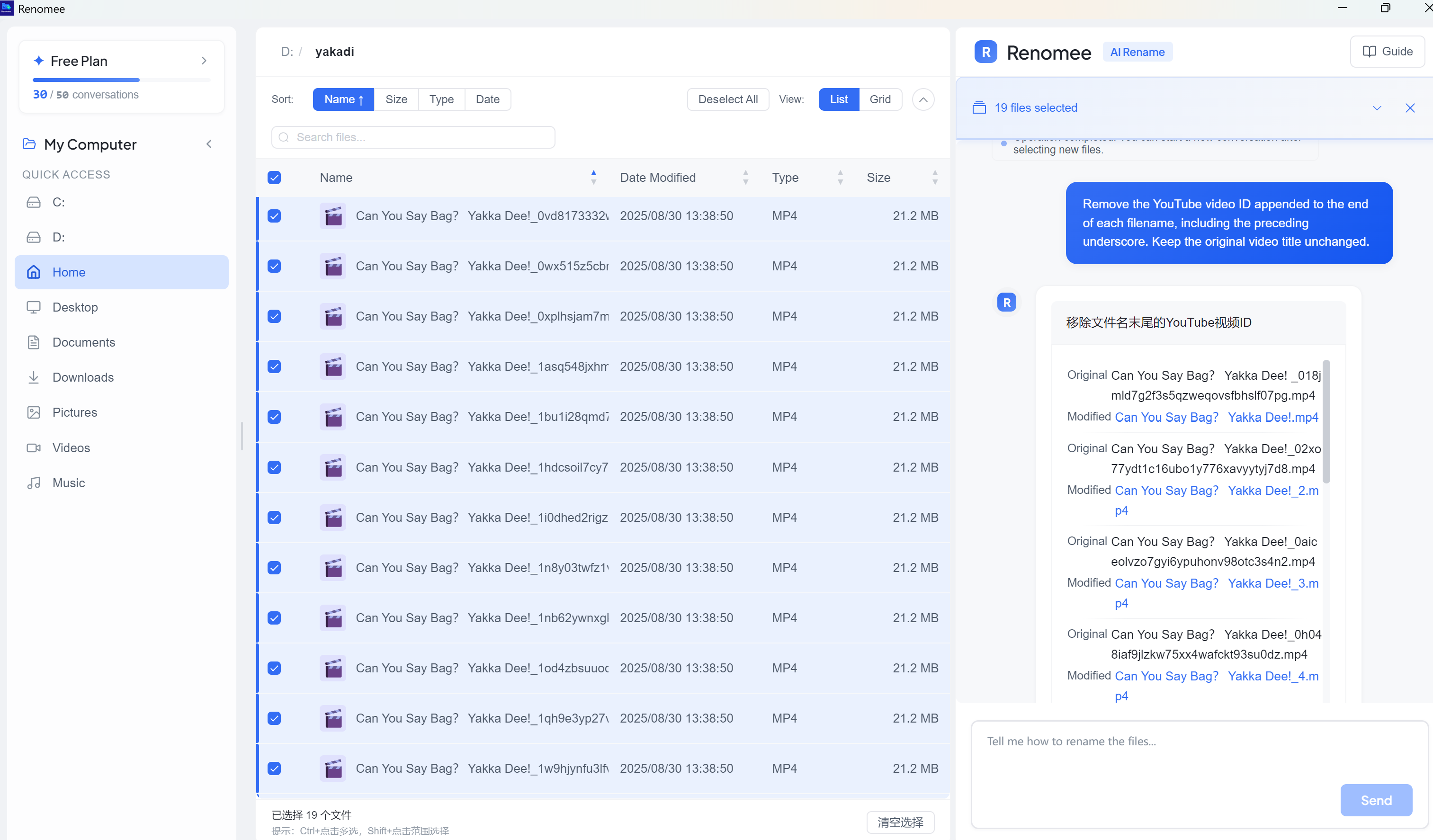
BRU's interface was designed for IT professionals who need every option visible at once. Renomee focuses on one thing at a time. Scroll horizontally to see the full screenshot.
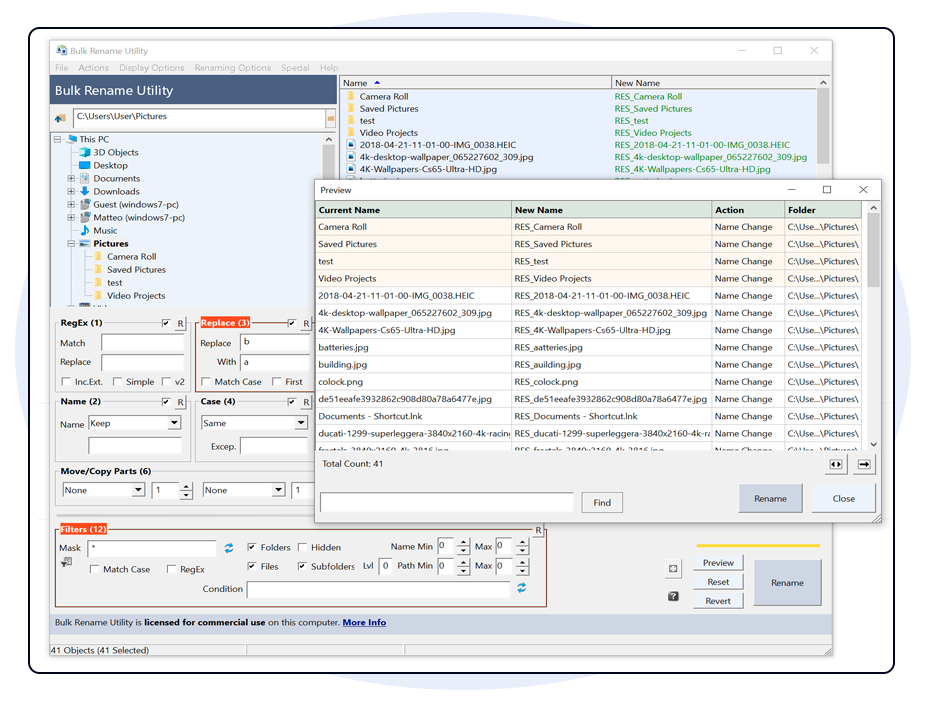
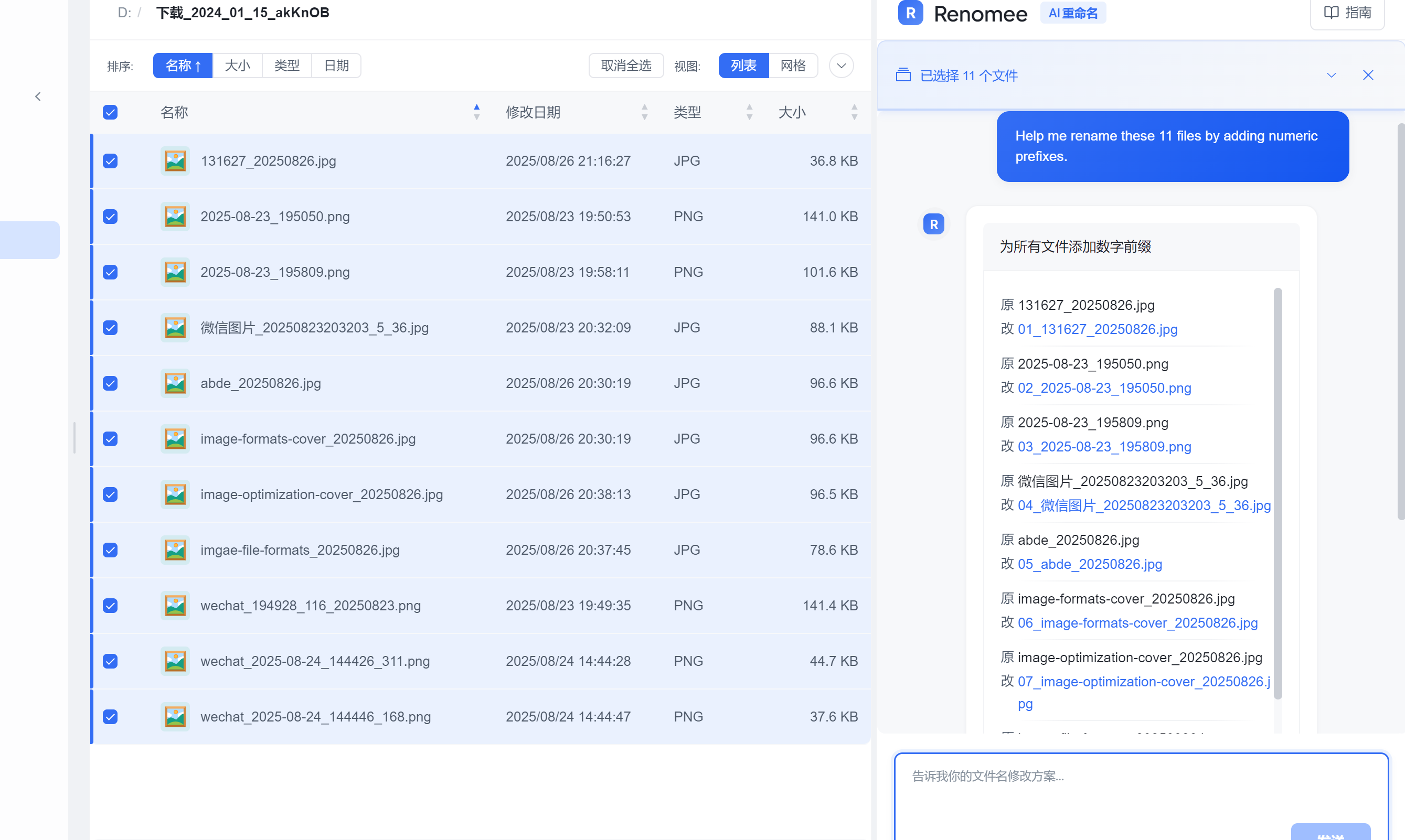
Bulk Rename Utility14 operation panels
Bulk Rename Utility interface screenshot
🖼️Place screenshot at:public/images/bru-interface.png
⚠️All 14 operation panels are visible at once — even for a simple rename task
RenomeePlain English rules
Renomee interface screenshot
🖼️Place screenshot at:public/images/renomee-interface-en.png
✓Type one instruction — AI understands and executes with zero learning curve

Where Bulk Rename Utility Is Still Better

User type
Sequential numbering with exact control
→ Use BRU
BRU's Number (2) panel: set start value, increment, zero-padding width, and position independently. For large batches requiring precise formatting (project_0001.jpg through project_1000.jpg), BRU is more predictable than natural-language specs.
User type
Advanced regex and scripting pipelines
→ Use BRU
IT automation workflows using complex regex patterns, JavaScript methods, or CSV-driven batch rules. BRU's scripting capabilities are purpose-built for these pipelines and have no direct equivalent in Renomee.
User type
Offline and sensitive document workflows
→ Use BRU
BRU runs fully offline. Renomee's AI content-reading features require an internet connection. For sensitive documents that must not leave your local network, BRU is the appropriate choice.
User type
Rename PDFs, invoices, or scanned files by content
→ Use Renomee
If your files are named scan_001.pdf or download(3).pdf, no BRU rule can help — the useful information is inside the file, not the name. Renomee reads vendor names, invoice numbers, document titles, and more via OCR and AI.
User type
Non-technical teams
→ Use Renomee
BRU's 14 operation panels require significant learning time. Renomee lets anyone on the team describe a rename rule in plain English — no training, no regex knowledge assumed.
User type
EXIF photo renaming + visual content labels
→ Renomee has an edge
Both tools read EXIF data. BRU's EXIF picker is reliable and offline. Renomee additionally offers AI visual analysis — useful when GPS location data is missing and you want a label based on what's actually in the image.

Renomee Is Built for BRU Users Who Hit This Wall

If any of these match your situation, AI-powered renaming will save you more time than learning another BRU panel.

You've spent 20–30 minutes configuring a BRU regex that still doesn't produce the right output

In Renomee, describe the transformation in plain English and see a live preview. If the result is wrong, adjust the description — not the syntax. No debugging. No escaping special characters.

Your files need names based on what's written inside them — not what they're already called

scan_001.pdf, download(3).pdf, Invoice_final.pdf — when the useful information is inside the document, no rule-based tool can help. BRU sees only the filename. Renomee reads PDF text, extracts data from scanned files via OCR, and understands what's actually in the document.

You have a mixed folder where files don't follow a consistent format

Invoices from five different vendors, each with a different field layout. A batch regex needs to handle every format — or you write five different rules. Renomee's AI reads each file individually and adapts. Same instruction, different files, correct results for each.

You want to share renaming workflows with teammates who haven't learned BRU

BRU rule exports are opaque to non-technical users. A Renomee instruction like 'rename using vendor name and invoice date from the document' is readable by anyone on the team. No training. No 'ask the IT person'.

Your task is too complex for regex but too specific to write a custom script for

Rename PDFs by extracting the client name from the first paragraph. Rename photos by describing what's visually in the image. These tasks would take hours to script — and the script would break on edge cases. In Renomee, you describe it once.

Frequently Asked Questions

Does Bulk Rename Utility require regex for everything?

No. BRU's GUI panels handle many common tasks without any regex: adding prefixes or suffixes (Add panel), sequential numbering with zero-padding (Number panel), case changes (Case panel), and character removal (Remove panel). The EXIF and ID3 panels also work entirely via GUI. Regex is only needed for complex pattern matching — such as extracting or rearranging parts of a filename. Most everyday BRU users never touch the RegEx panel.

Does Bulk Rename Utility support EXIF and ID3 metadata?

Yes, and this is one of BRU's genuine strengths. BRU has a dedicated EXIF panel for photo renaming (DateTimeOriginal, ISO, Aperture, GPS, etc.) and built-in ID3 tag support for audio files. Both work entirely via the GUI — no regex or scripting needed. Renomee also reads EXIF and ID3 data, and additionally offers AI visual analysis for describing photo content when metadata alone isn't enough.

Can Renomee replace all Bulk Rename Utility functionality?

Renomee covers most everyday BRU use cases: batch find/replace, prefix/suffix, date-based naming, EXIF/ID3 metadata renaming, and content-based naming (which BRU can't do at all). For scripted IT automation built around BRU's JavaScript engine, or for sequential numbering requiring precise step/padding/suffix control, BRU still has advantages.

What is the best free Bulk Rename Utility alternative?

Renomee's free tier lets you rename a batch of up to 60 files per day — no account required to start. For rule-based renaming without AI, PowerRename (free with Windows PowerToys) is solid. BRU itself is also free, so the choice usually comes down to learning curve and whether you need content-reading capability.

Can I batch rename files without knowing regex?

Yes. Renomee replaces regex entirely with plain English instructions. Instead of writing scan_(\d+)\.pdf → invoice_$1.pdf, you type: 'rename these scanned invoices using the invoice number on each page'. BRU also handles many tasks without regex — prefix, suffix, numbering, case, and metadata renaming all work via GUI panels.

Can I import my BRU renaming rules into Renomee?

BRU uses a proprietary rule format — you can't import BRU rules directly into Renomee. However, most BRU use cases can be recreated by describing the intended transformation in plain English. For regex-heavy rules, describe what the rule does rather than copying the expression.

Can Renomee rename files without an internet connection?

Standard batch operations in Renomee — prefix, suffix, numbering, and date-based renaming — work offline. AI content-reading features (extracting text from PDFs, OCR on scanned documents, analyzing image visual content) require an internet connection to process via the AI model.

Is Bulk Rename Utility being discontinued?

No. BRU is still actively maintained as of 2026. Many users switch because of its learning curve and lack of content-reading capability — not because it stopped working. If your workflow is already built around BRU and you're comfortable with it, there's no reason to switch unless you need AI or content-based renaming.

Related Guides

All Windows Batch Rename Tools Compared
Explorer vs PowerRename vs BRU vs Renomee — full 4-tool comparison
Batch Rename PDFs by Content
Extract PDF titles, authors, and metadata for naming
AI vs Regex File Renaming: Workflow Compared
Side-by-side workflow comparison: BRU regex vs AI renaming
Batch Rename Invoices by OCR
Extract vendor names and dates from scanned PDF invoices
PowerRename Alternative
Need more than pattern matching?
Windows Batch Renaming Hub
All Windows rename guides

Start with the Files BRU Can't Name

Try Renomee free — up to 60 files per batch, no account required. Start with your hardest folder: scanned invoices, PDFs without useful names, or photos you've been renaming manually. See what one sentence can do.

Download Renomee FreeSee Pricing

Windows 10/11 · No credit card required · Free tier: 60 files/batch/day