Best Bulk Rename Utility Alternative (2026)
Bulk Rename Utility has two fundamental problems most users hit immediately: the interface is overwhelming (14 operation panels, cryptic labels, regex required for anything non-trivial), and it cannot read what's inside your files — so scan_001.pdf stays meaningless no matter how clever your rules are. Here are the alternatives that solve both.
Why People Look for a BRU Alternative
Bulk Rename Utility has been the gold standard for Windows power users since 2001. But 'powerful' and 'usable' aren't the same thing. Here's what drives users to look for something better:
The interface is overwhelming
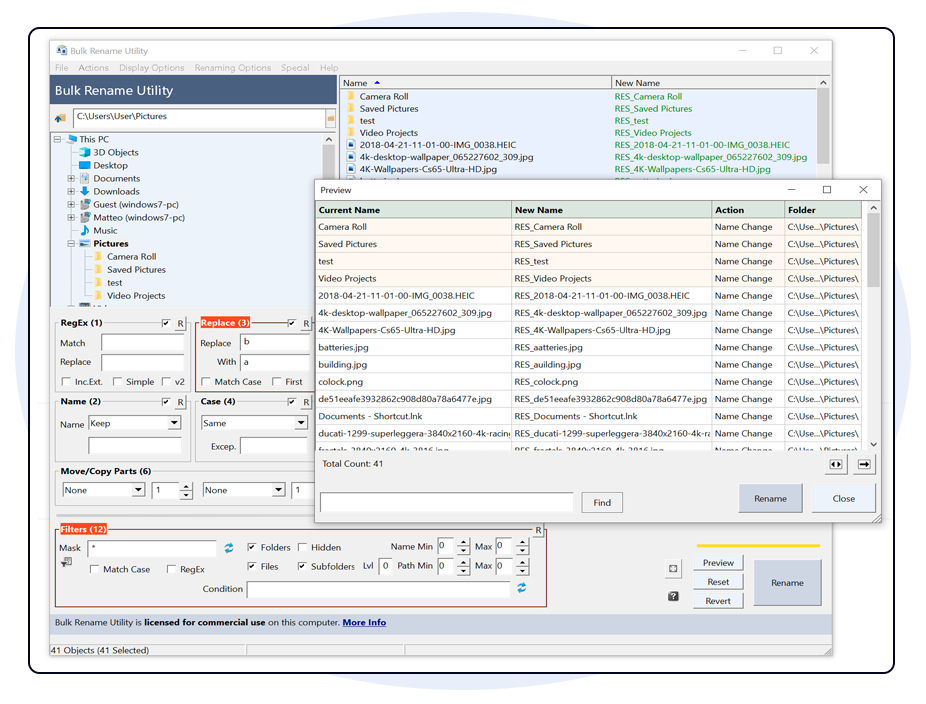
14 operation panels visible at once. Rename, Number, Replace, Case, Remove, Add, Move, Strip, Change, Ext., Reg. Ex., Script, UserDefined, EXIF — all on screen simultaneously. Most users need one or two of these at a time.
Complex tasks require regex
Want to extract a date from a filename? Swap two parts of a name? You need regular expressions. BRU's regex documentation spans multiple pages. Most office workers don't have this skill — and shouldn't need it to rename files.
Can't read file content
Your files are named scan_001.pdf, IMG_9823.jpg, document.docx. BRU can only work with what's already in the filename. It can't look inside your PDFs or images to extract meaningful names from the content.
Doesn't work for teams
In most teams, only 1-2 people know how to use BRU. Everyone else either asks that person for help or gives up and renames files manually. That's a workflow bottleneck, not a feature.
The 3 Best Bulk Rename Utility Alternatives
Ranked by ease of use for non-technical users — the most common reason people switch from BRU.
Renomee
Top PickAI-powered batch renaming — describe what you want in plain English
Best for: Non-technical users, teams, content-based renaming (PDFs, invoices, photos)
PowerRename
Built-in WindowsMicrosoft PowerToys — regex-optional, built into Windows
Best for: Windows power users who need pattern matching but want a simpler interface than BRU
Advanced Renamer
Middle GroundGUI-based with scripting — easier than BRU, more control than PowerRename
Best for: Technical users who want BRU-level power with a cleaner interface
Feature Comparison
Choosing a replacement for Bulk Rename Utility? All four tools below are free to start. The difference is what they can do — and how long it takes to learn. Renomee's free tier lets you rename a batch of up to 60 files per day with no account required.
| Feature | Bulk Rename Utility | Renomee★ Recommended | PowerRename | Advanced Renamer |
|---|---|---|---|---|
| Learning curve | High | None | Low | Medium |
| Requires regex | Yes (for complex) | No | Optional | No |
| Reads file content (AI/OCR) | ||||
| Natural language rules | ||||
| EXIF / ID3 metadata | ||||
| Windows right-click integration | ||||
| Price | Free | Free tier | Free | Free |
| Best for | IT admins | Everyone | Win users | Intermediate |
Renomee wins on usability and content-aware renaming. BRU still leads for scripted IT automation workflows. PowerRename is the best built-in Windows option.
Before & After: BRU Regex vs Renomee Natural Language
Real scenario: You have 50 invoice PDFs named scan_001.pdf through scan_050.pdf. You want to rename them using the vendor name and invoice number found on each document.
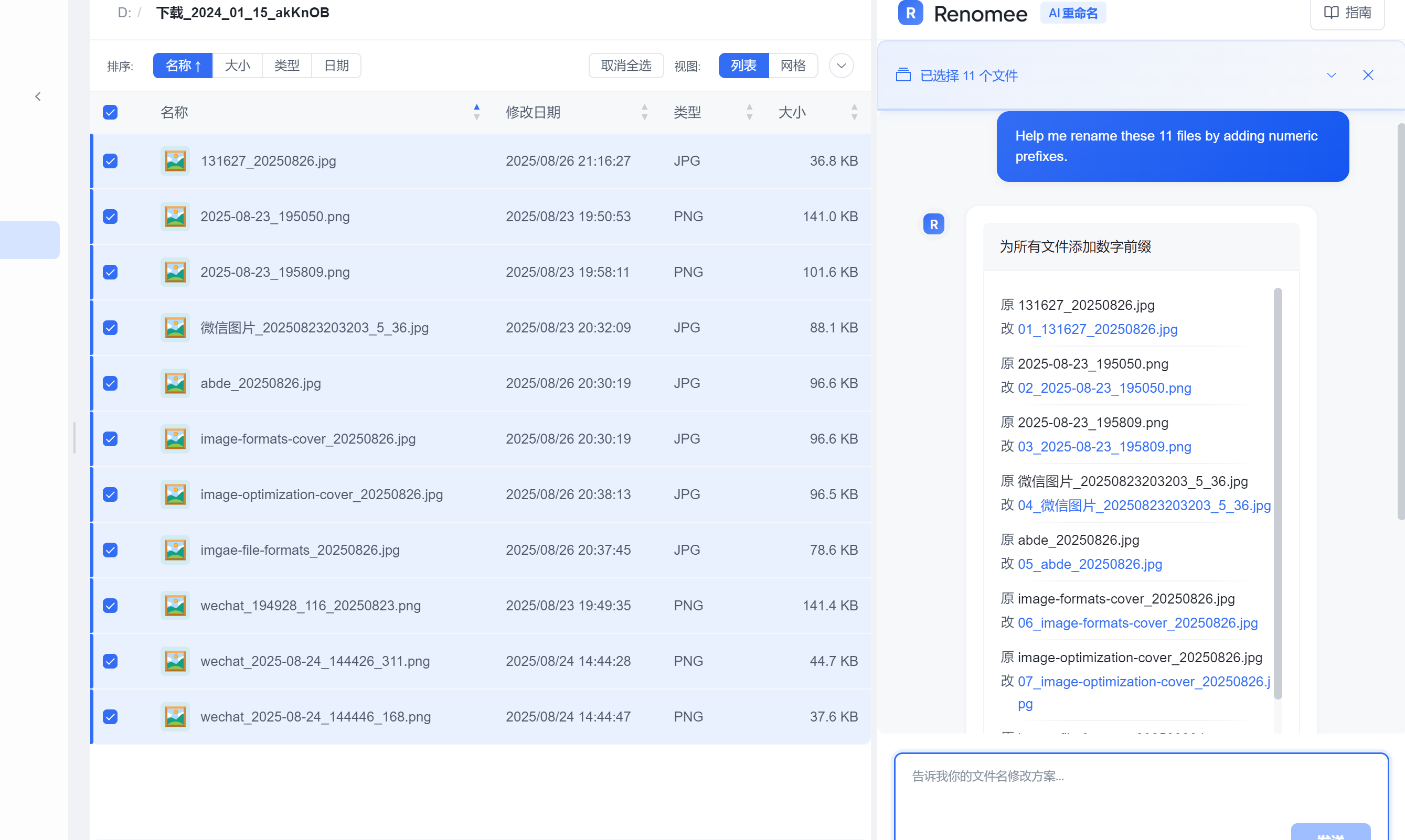
Interface Comparison: See the Difference
BRU's interface was designed for IT professionals who need every option visible at once. Renomee focuses on one thing at a time. Scroll horizontally to see the full screenshot.
Who Should Use Which Tool
Frequently Asked Questions
What is the easiest alternative to Bulk Rename Utility?
Renomee is the easiest Bulk Rename Utility alternative. Instead of navigating 14 operation panels and writing regex, you describe your renaming rule in plain English. Renomee also reads file content — something BRU can't do at all.
Is Bulk Rename Utility being discontinued?
No. Bulk Rename Utility is still actively maintained as of 2026. However, many users switch because of its steep learning curve and lack of AI or content-reading capabilities, not because it stopped working.
Can I import my BRU renaming rules into Renomee?
BRU uses a proprietary rule format. You can't import BRU rules directly into Renomee, but most BRU use cases can be replicated by describing the rule in plain English to Renomee — often in less time than it took to configure BRU.
Does Renomee replace all Bulk Rename Utility functionality?
Renomee covers most everyday BRU use cases: batch renaming, sequential numbering, prefix/suffix, metadata-based naming, and content-based naming (which BRU can't do). For scripted IT automation pipelines built around BRU's advanced regex engine, BRU may still be appropriate.
What is the best free Bulk Rename Utility alternative?
Renomee's free tier lets you rename a batch of up to 60 files per day — no account required to start. For unlimited rule-based renaming without AI, PowerRename (free with Windows PowerToys) is also a solid free option. Both are significantly easier to use than BRU.
Can I batch rename files without knowing regex?
Yes. Renomee replaces regex entirely with plain English instructions. Instead of writing a pattern like scan_(\d+)\.pdf → invoice_$1.pdf, you type: "rename these scanned invoices using the invoice number on each page". The free tier covers batches of up to 60 files per day with no technical knowledge required.
What should I use when Bulk Rename Utility is not working as expected?
The most common BRU frustrations fall into two categories: interface confusion (which of the 14 panels does what I need?) and content limitations (BRU can't rename files based on what's inside them). If your files are named scan_001 or IMG_9823, no BRU configuration will help — the useful information isn't in the filename. Renomee reads the file content directly and generates names from what's actually inside.
Related Guides
Ready to Leave BRU Behind?
Try Renomee free — rename a batch of up to 60 files per day, no account required. Rename your first batch in under 3 minutes.
Windows 10/11 · No credit card required · Free tier: 60 files/batch/day